400IT Networking Coursework 1 Practical Assessment – Lab Scenario Worksheet
400IT Coursework 1 Practical Assessment – Lab Scenario Worksheet
*This document is for CU Group students for their own use in completing their assessed work for this module and should not be passed to third parties or posted on any website. Any infringements of this rule should be reported to engagement@coventry.ac.uk
Task 1: Design an IP Addressing Scheme using VLSM (Total marks = 12)
For the IP addressing scheme, assign unique subnets to the departments in branches (a department in a branch will have a unique subnet). Utilise a subnetting technique which enhances IP address distribution while allowing for future scalability. Each device in the network must be assigned an IP address.
Given an IP address and mask of 210.165.10.0/24, design an IP addressing scheme which fulfils the following requirements in the table below using the VLSM approach for efficient use of IP addresses.
The 0th subnet is used. No subnet calculators should be used.
| Subnet | York
Headquarters |
London
Branch |
Warsaw
Branch |
Number of Hosts |
| Marketing Department (Subnet A) | 4 | 6 | 6 | 16 |
| Sales Department (Subnet B) | 4 | 4 | 4 | 12 |
| IT Department (Subnet C) | 4 | 2 | 2 | 8 |
| Total | 12 | 12 | 12 | 36 |
YORK – Marketing
Network: 210.165.10.0
Broadcast: 210.165.10.15
| Specification | Student Input | |
| Default Subnet Mask (binary) | 11111111.11111111.11111111.00000000 | |
| Custom Subnet Mask (decimal) | 255.255.255.240 | |
| Total number of subnets | 16 | |
| Total number of host addresses | 16 | |
| Number of usable addresses | 14 | |
| Number of bits borrowed | 4 | |
| First IP host address | 210.165.10.1 | |
| Last IP host address | 210.165.10.14 |
YORK – Sales
Network: 210.165.10.16
Broadcast: 210.165.10.31
| Specification | Student Input | |
| Default Subnet Mask (binary) | 11111111.11111111.11111111.00000000 | |
| Custom Subnet Mask (decimal) | 255.255.255.240 | |
| Total number of subnets | 16 | |
| Total number of host addresses | 16 | |
| Number of usable addresses | 14 | |
| Number of bits borrowed | 4 | |
| First IP host address | 210.165.10.17 | |
| Last IP host address | 210.165.10.30 |
YORK – IT
Network: 210.165.10.32
Broadcast: 210.165.10.47
| Specification | Student Input | |
| Default Subnet Mask (binary) | 11111111.11111111.11111111.00000000 | |
| Custom Subnet Mask (decimal) | 255.255.255.240 | |
| Total number of subnets | 16 | |
| Total number of host addresses | 16 | |
| Number of usable addresses | 14 | |
| Number of bits borrowed | 4 | |
| First IP host address | 210.165.10.33 | |
| Last IP host address | 210.165.10.46 |
LONDON – Marketing
Network: 210.165.10.48
Broadcast: 210.165.10.63
| Specification | Student Input | |
| Default Subnet Mask (binary) | 11111111.11111111.11111111.00000000 | |
| Custom Subnet Mask (decimal) | 255.255.255.240 | |
| Total number of subnets | 16 | |
| Total number of host addresses | 16 | |
| Number of usable addresses | 14 | |
| Number of bits borrowed | 4 | |
| First IP host address | 210.165.10.49 | |
| Last IP host address | 210.165.10.62 |
LONDON – Sales
Network: 210.165.10.64
Broadcast: 210.165.10.79
| Specification | Student Input | |
| Default Subnet Mask (binary) | 11111111.11111111.11111111.00000000 | |
| Custom Subnet Mask (decimal) | 255.255.255.240 | |
| Total number of subnets | 16 | |
| Total number of host addresses | 16 | |
| Number of usable addresses | 14 | |
| Number of bits borrowed | 4 | |
| First IP host address | 210.165.10.65 | |
| Last IP host address | 210.165.10.78 |
LONDON – IT
Network: 210.165.10.80
Broadcast: 210.165.10.95
| Specification | Student Input | |
| Default Subnet Mask (binary) | 11111111.11111111.11111111.00000000 | |
| Custom Subnet Mask (decimal) | 255.255.255.240 | |
| Total number of subnets | 16 | |
| Total number of host addresses | 16 | |
| Number of usable addresses | 14 | |
| Number of bits borrowed | 4 | |
| First IP host address | 210.165.10.81 | |
| Last IP host address | 210.165.10.94 |
WARSAW – Marketing
Network: 210.165.10.96
Broadcast: 210.165.10.111
| Specification | Student Input | |
| Default Subnet Mask (binary) | 11111111.11111111.11111111.00000000 | |
| Custom Subnet Mask (decimal) | 255.255.255.240 | |
| Total number of subnets | 16 | |
| Total number of host addresses | 16 | |
| Number of usable addresses | 14 | |
| Number of bits borrowed | 4 | |
| First IP host address | 210.165.10.97 | |
| Last IP host address | 210.165.10.110 |
WARSAW – Sales
Network: 210.165.10.112
Broadcast: 210.165.10.127
| Specification | Student Input | |
| Default Subnet Mask (binary) | 11111111.11111111.11111111.00000000 | |
| Custom Subnet Mask (decimal) | 255.255.255.240 | |
| Total number of subnets | 16 | |
| Total number of host addresses | 16 | |
| Number of usable addresses | 14 | |
| Number of bits borrowed | 4 | |
| First IP host address | 210.165.10.113 | |
| Last IP host address | 210.165.10.126 |
WARSAW – IT
Network: 210.165.10.128
Broadcast: 210.165.10.143
| Specification | Student Input | |
| Default Subnet Mask (binary) | 11111111.11111111.11111111.00000000 | |
| Custom Subnet Mask (decimal) | 255.255.255.240 | |
| Total number of subnets | 16 | |
| Total number of host addresses | 16 | |
| Number of usable addresses | 14 | |
| Number of bits borrowed | 4 | |
| First IP host address | 210.165.10.129 | |
| Last IP host address | 210.165.10.142 |
Task 2: Build and Configure the Network (Total marks = 15)
Build the network infrastructure as depicted in the provided diagram using Cisco Packet Tracer. Connect Warsaw and London branches to the headquarters in York using appropriate network devices such as routers and switches. Configure the devices with the designated IP addresses from Task 1. Any missing host should be included.
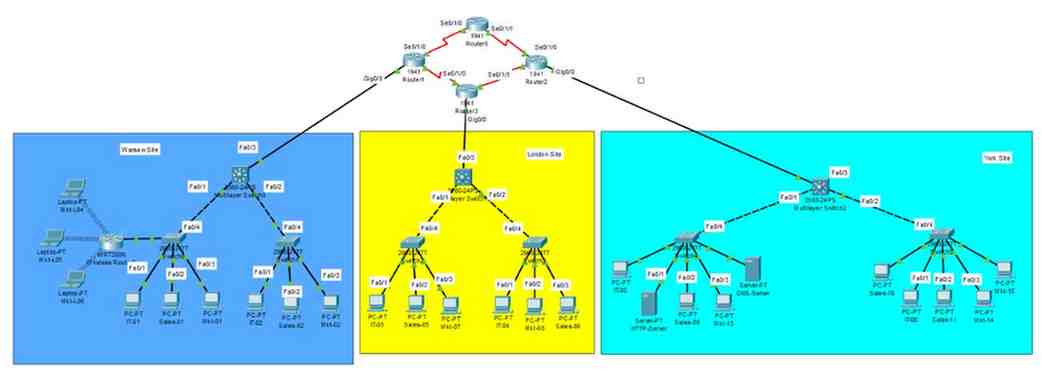
Step 1
Select all the devices such as PCs, servers, laptops, switches, and routers
Step 2
Cable the network as shown in the topology.
Step 3
Configure the IP addresses and default gateway for the end-user devices (PC). The network router will use the FIRST network host address. Host computers will use any address in the subnet.
After configuring each host computer, record the host network settings with the ipconfig /all command and write down the information using the table below.
York Headquarters
| Marketing Department (Subnet A) | |||||
| Device | IP address | Subnet Mask | Gateway | MAC Address | Marks (3 marks) |
| Mkt-01 | 210.165.10.2 | 255.255.255.240 | 210.165.10.1 | ||
| Mkt-02 | 210.165.10.3 | 255.255.255.240 | 210.165.10.1 | ||
| Mkt-03 | 210.165.10.4 | 255.255.255.240 | 210.165.10.1 | ||
| Mkt-04 | 210.165.10.5 | 255.255.255.240 | 210.165.10.1 | ||
| Sale Department (Subnet B) | |||||
| Sales-01 | 210.165.10.18 | 255.255.255.240 | 210.165.10.17 | ||
| Sales-02 | 210.165.10.19 | 255.255.255.240 | 210.165.10.17 | ||
| Sales-03 | 210.165.10.20 | 255.255.255.240 | 210.165.10.17 | ||
| Sales-04 | 210.165.10.21 | 255.255.255.240 | 210.165.10.17 | ||
| IT Department (Subnet C) | |||||
| IT-01 | 210.165.10.34 | 255.255.255.240 | 210.165.10.33 | ||
| IT-02 | 210.165.10.35 | 255.255.255.240 | 210.165.10.33 | ||
| IT-03 (HTTP) | 210.165.10.36 | 255.255.255.240 | 210.165.10.33 | ||
| IT-04 (DNS) | 210.165.10.37 | 255.255.255.240 | 210.165.10.33 | ||
London Branch
| Marketing Department (Subnet D) | |||||
| Device | IP address | Subnet Mask | Gateway | MAC Address | Marks (3 marks) |
| Mkt-05 | 210.165.10.50 | 255.255.255.240 | 210.165.10.49 | ||
| Mkt-06 | 210.165.10.51 | 255.255.255.240 | 210.165.10.49 | ||
| Mkt-08 | 210.165.10.52 | 255.255.255.240 | 210.165.10.49 | ||
| Mkt-08 | 210.165.10.53 | 255.255.255.240 | 210.165.10.49 | ||
| Mkt-09 | 210.165.10.54 | 255.255.255.240 | 210.165.10.49 | ||
| Mkt-10 | 210.165.10.55 | 255.255.255.240 | 210.165.10.49 | ||
| Sale Department (Subnet E) | |||||
| Sales-05 | 210.165.10.66 | 255.255.255.240 | 210.165.10.65 | ||
| Sales-06 | 210.165.10.67 | 255.255.255.240 | 210.165.10.65 | ||
| Sales-07 | 210.165.10.68 | 255.255.255.240 | 210.165.10.65 | ||
| Sales-08 | 210.165.10.69 | 255.255.255.240 | 210.165.10.65 | ||
| IT Department (Subnet F) | |||||
| IT-05 | 210.165.10.82 | 255.255.255.240 | 210.165.10.81 | ||
| IT-06 | 210.165.10.83 | 255.255.255.240 | 210.165.10.81 | ||
Warsaw Branch
| Marketing Department (Subnet A) | ||||||
| Device | IP address | Subnet Mask | Gateway | MAC Address | Marks (3 marks) | |
| Mkt-11 | 210.165.10.98 | 255.255.255.240 | 210.165.10.97 | |||
| Mkt-12 | 210.165.10.99 | 255.255.255.240 | 210.165.10.97 | |||
| Mkt-13 | 210.165.10.100 | 255.255.255.240 | 210.165.10.97 | |||
| Mkt-L14 |
210.165.10.101 |
255.255.255.240 | 210.165.10.97 | |||
| Mkt-L15 |
210.165.10.102 |
255.255.255.240 | 210.165.10.97 | |||
| Mkt-L16 | 210.165.10.103 | 255.255.255.240 | 210.165.10.97 | |||
| Sales Department (Subnet B) | ||||||
| Sales-09 | 210.165.10.114 | 255.255.255.240 | 210.165.10.113 | |||
| Sales-10 | 210.165.10.115 | 255.255.255.240 | 210.165.10.113 | |||
| Sales-11 | 210.165.10.116 | 255.255.255.240 | 210.165.10.113 | |||
| Sales-12 | 210.165.10.117 | 255.255.255.240 | 210.165.10.113 | |||
| IT Department (Subnet C) | ||||||
| IT-07 | 210.165.10.130 | 255.255.255.240 | 210.165.10.129 | |||
| IT-08 | 210.165.10.131 | 255.255.255.24 | 210.165.10.129 | |||
Step 4: Configure VLANs for different departments as shown in the topology: (6 marks)
- VLAN 10: Marketing
- VLAN 20: Sales
- VLAN 30: IT
Task 3: Implement a routing protocol for communication (Total marks = 19)
Implement a suitable dynamic routing protocol to facilitate communication between routers in the network. Ensure efficient routing of data packets between different subnets and branches.
Step 1
Configure the following routers and state the IP addresses of their interfaces using the table provided below: (4 marks)
| Device | IP address |
| Router 1- Se0/1/0 | |
| Router 1- Se0/1/1 | |
| Router 2-Se0/1/0 | |
| Router 2-Se0/1/1 | |
| Router 3-Se0/1/0 | |
| Router 3-Se0/1/1 | |
| Router 4-Se0/1/0 | |
| Router 4-Se0/1/1 |
Step 2
Configure an IP address for the following routers and Layer 3 Switches interfaces using addressing scheme mentioned in Task 1.
Record IP Address for interface indicated in the table below. (3 marks)
| Device | IP address | Subnet Mask |
| Router 1-Gig 0/0 | ||
| Router2-Gig 0/0 | ||
| Router 3-Gig 0/0 | ||
| Multilayer Switch1- Fa 0/3 | ||
| Multilayer Switch2- Fa 0/3 | ||
| Multilayer Switch3- Fa 0/3 |
Step 3
Configuration tasks for each router should also include the following: (8 marks)
| Task | Specification |
| Router name | Router (number) |
| Encrypted privileged exec password | cisco |
| Console access password | class (number) |
| Telnet access password | class (number) |
| Domain name | network.local |
| Generate RSA keys | crypto key generate rsa (1024 bits) |
| Configure SSH username & password | username admin password admin123 |
| Set login banner message | banner motd #
Unauthorized access is prohibited. # |
Step 4
Show the Routing Table for each Router. (4 marks – 1 mark per row)
| Device | Protocol | Networks Advertised | Configuration Commands |
| Router1 | |||
| Router2 | |||
| Router3 | |||
| Router4 |
Task 4: Use ping and traceroute commands for basic network testing (Total marks = 12)
Conduct network testing using the ping and traceroute commands for connectivity across devices. Troubleshoot and resolve any connectivity issues which may arise during testing.
Ping and traceroute are network testing commands to check the TCP/IP network connectivity. Ping is a network administration utility used to test the reachability of a device on a network. Traceroute utility is a network diagnostic tool for displaying the route and measuring the transit delays of packets travelling on a network.
Step 1
Use the ping command to verify network connectivity.
Network connectivity can be verified with the ping command. Use the following table to methodically verify connectivity with each network device. Take corrective action to establish connectivity if a test fails: (6 marks)
| From | To (Destination) | IP Address (Destination) | Ping results
(Screenshot) |
| IT-01 | IT-02 | ||
| Sales-02 | Mkt-L04 | ||
| Mkt-01 | IT-05 | ||
| Sales-02 | Router1 se0/1/0 | ||
| Router3 se/0/1/1 | Mkt-L06 | ||
| IT-01 | Multilayer Switch2- Fa 0/3 |
Step 2
Use the “tracert” command to verify network connectivity.
Use the tracert command to trace the path to a specific destination and write down the path to the destination. (6 marks)
| From | To (Destination) | IP Address (Destination) | Path to destination (Screenshot) |
| Sales-03 | Sales-01 | ||
| Mkt-L05 | Router4 se/0/1/1 | ||
| IT-01 | Router1 se0/1/0 | ||
| Sales-05 | Mkt-02 | ||
| IT-01 | Multilayer Switch3- Fa 0/3 | ||
| Mkt-01 | Router2 se0/1/0 |
Task 5 Set Up and Configure Servers (Total marks = 12)
Configure HTTP and DNS servers on designated devices within the network. Set up necessary resources such as websites for the HTTP server and DNS records for the DNS server. Ensure proper communication and access to these servers from devices within the network.
Step 1
Configure the IP address for DNS and HTTP Server, write down the IP addresses on the table below:
| Device | IP address | Default Gateway | Subnet Mask | Marks (6 marks) |
| DNS Server | ||||
| HTTP Server |
Step 2
Complete the DNS address field for Mkt-01 and HTTP Server with the IP address of the DNS Server
Step 3
Open the DNS Server, then add the URL: www.coventrylab.ac.uk as the domain name for the IP address of the HTTP Server
Step 4
Open the browser from Mkt-01, type in the URL: www.coventrylab.ac.uk in the address bar and open the web page. Take a snapshot of what comes up on the webpage or landing page and paste it in the text box below:
| Text box | Marks (6 marks) |
Struggling with 400IT Networking Coursework 1 Practical Assessment?
The post 400IT Networking Coursework 1 Practical Assessment – Lab Scenario Worksheet appeared first on Students Assignment Help UK.